


We talk a lot about GPU inference speed at AI Gear Lab. But there is another bottleneck in the AI workflow that often gets ignored: You.
If you are a Prompt Engineer or an AI-assisted developer, you likely type the same system instructions (“Act as a Python expert…”, “Refactor this code…”) dozens of times a day. You also scroll through endless horizontal lines of code or JSON outputs.
Standard office gear slows you down. To keep up with the speed of thought, you need hardware that supports Macros and Infinite Scrolling.
The Keyboard: Why QMK/VIA is a Superpower
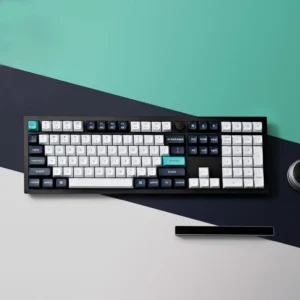
For AI professionals, a keyboard isn’t just for typing; it’s a control panel. We recommend the Keychron Q6 Max not just for its feel, but for its brain.
The Power of “One-Key Prompts”
Using the VIA software supported by Keychron, you can program a single key to type out an entire paragraph instantly.
- F13 Key: Types “Please explain this code step-by-step.”
- F14 Key: Types “Convert this function to TypeScript.”
- Knob: Rotate to zoom in/out of your code editor.
This feature alone can save you thousands of keystrokes per week.
The Mouse: Conquering Horizontal Data
Have you ever inspected a minified JSON response from an API? Or reviewed a long line of Python code that runs off the screen? Using a bottom scroll bar is tedious.
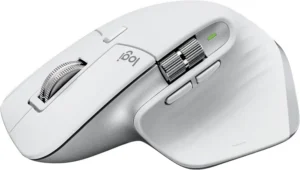
Enter the Logitech MX Master 3S. It is the industry standard for a reason.
1. The Side Scroll Wheel
This is the killer feature for coding. Use your thumb to scroll horizontally through datasets and code timelines naturally. Once you get used to it, you cannot go back.
2. MagSpeed™ Infinite Scroll
Need to get to the bottom of a 5,000-line context window log? Flick the main wheel, and it spins freely, scrolling 1,000 lines per second. It stops precisely where you need it.
The Perfect “AI Interaction” Combo
Building a PC with an RTX 4090 gives you the backend power. But upgrading your peripherals gives you the frontend speed.
| Workflow Pain Point | The Solution |
|---|---|
| Repetitive System Prompts | Keychron Q6 Max (Macro Keys) |
| Navigating Wide Code/JSON | MX Master 3S (Thumb Wheel) |
| Wrist Fatigue | Gasket Mount + Ergonomic Shape |
Conclusion
Don’t let your physical inputs be the bottleneck for your artificial intelligence. An investment in the Keychron Q6 Max and MX Master 3S is an investment in your daily efficiency.
Check out the current prices for this productivity duo: